Turn your patch into a prioritised prospecting workspace.
Review daily updated on market, off market, multi agency and sold nearby property activity across the postcodes available to your branch. Use supported signals, history and filters to build a relevant shortlist before deciding how to act.
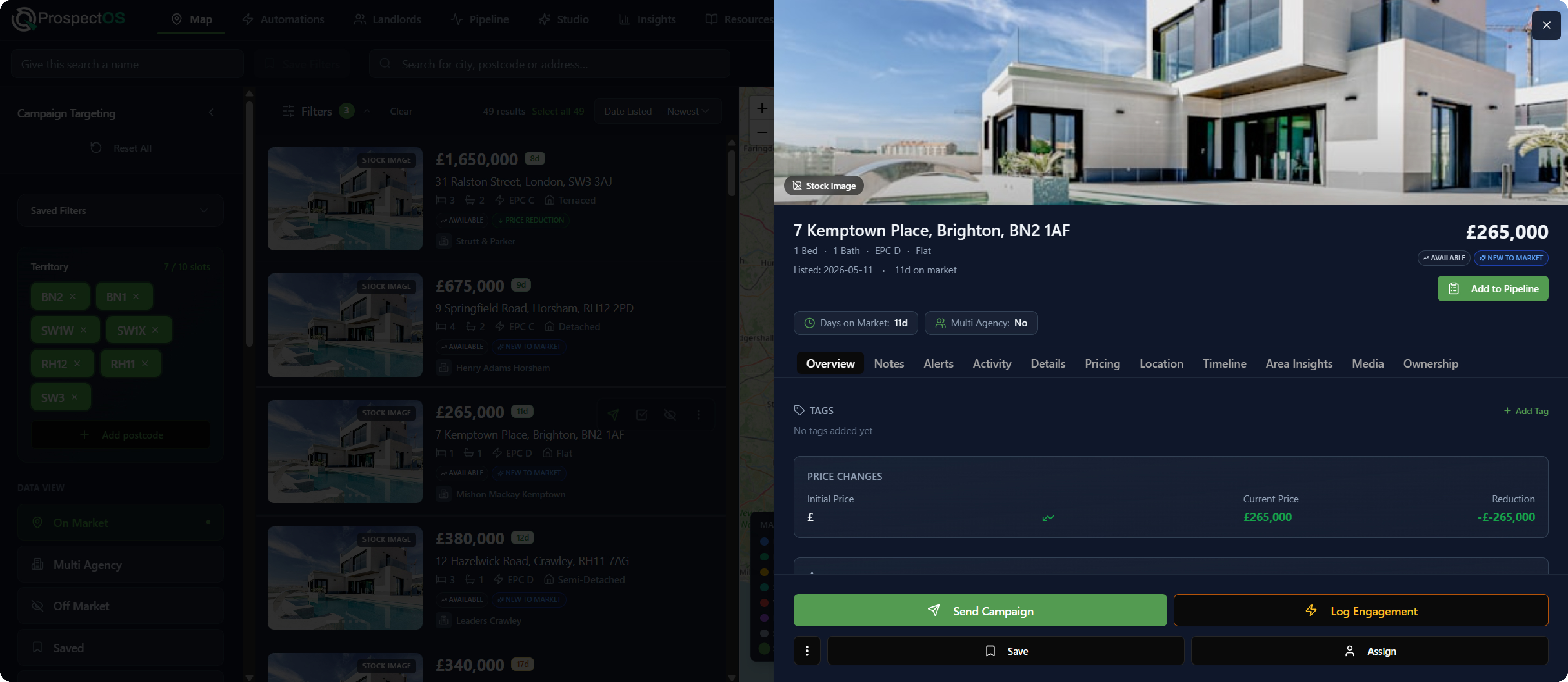
Find the opportunity. Understand the property. Take the next action.
ProspectOS brings supported property and market information into one branch scoped workspace, helping agents move from a changing patch to a more focused next action.
Find the opportunity
Review supported changes such as price reductions, withdrawals and back to market activity across the postcodes available to your branch.
HOW MAP HELPS
Understand the property
Use property history, filters, propensity reasons and local context to understand why a property may deserve attention.
HOW MAP HELPS
Take controlled action
Save, watch, add to Pipeline or prepare a controlled campaign without rebuilding the shortlist elsewhere.
HOW MAP HELPS
Build a shortlist and act without rebuilding the work.
The Map connects postcode scoped property intelligence with practical next actions, helping agents move from search to shortlist without exporting or recreating the audience.
Choose the territory
Load the postcodes available to the active branch and switch between Sales and Lettings.
Choose a working view
Select On Market, Multi Agency, Off Market, Saved, Blanket Canvas or Sold Near You.
Prioritise
Search, filter, sort, select properties or draw an area to isolate the opportunity.
Understand
Open the property panel to review available status, history, signals, propensity and team context.
Act
Save, watch, organise, add to Pipeline, connect landlord context or start a controlled campaign.
Choose the territory
Load the postcodes available to the active branch and switch between Sales and Lettings.
Choose a working view
Select On Market, Multi Agency, Off Market, Saved, Blanket Canvas or Sold Near You.
Prioritise
Search, filter, sort, select properties or draw an area to isolate the opportunity.
Understand
Open the property panel to review available status, history, signals, propensity and team context.
Act
Save, watch, organise, add to Pipeline, connect landlord context or start a controlled campaign.
Build the search once. Return to the same opportunity view whenever you need it.
Save the selected view, postcodes, filters, sort order and search context behind the prospecting routines your team runs regularly.
Saved searches help agents return to a useful working view without reconstructing the same criteria each time.
Take the shortlist into a controlled campaign.
Use the Map as the starting point for an approved A4 letter or A5 postcard. Select the property or audience, choose a Studio template, review recipients and estimated cost, then confirm the campaign after the applicable pre send checks.
Before campaign activity progresses, ProspectOS can check:
Filter for the opportunity, not just the address.
Use practical criteria to narrow the market by property fit, movement, competitor context, timing and previous prospecting activity. Available filters may vary according to the selected view.
Understand what changed before you decide what to do next.
Open a property from the map, list or search results to review the available property, market and team context. The information shown may vary by property and working view.
Keep the properties that matter visible and organised.
Save, watch, tag or hide properties to turn a broad territory view into a more manageable working list.
Keep a priority property in your saved view so you can return to it.
Create alerts for supported changes such as price, status, withdrawal or time on market.
Apply branch relevant labels to help group and revisit selected properties.
Remove an irrelevant property from the normal working view or apply the appropriate address protection where it should not enter campaign eligibility.
Keep the property and source context as the opportunity moves forward.
Map originated actions can carry relevant property and source context into connected ProspectOS workflows.
Add a selected property to Pipeline with its Map source context. Where connected, later campaign engagement can also create an attributed lead.
Explore the Prospecting PipelineUse supported property and ownership information as the starting point for landlord research and portfolio context.
See landlord prospectingChoose an approved A4 letter or A5 postcard template when starting a campaign.
Explore Studio templatesMap campaign activity contributes to campaign and postcode reporting. Later engagement, valuations and recorded outcomes can complete the attribution pathway.
Explore performance reporting in InsightsOne territory workspace, used differently across the branch.
Owners, managers, valuers, negotiators, lettings teams and self employed agents can use the same Map workspace for different prospecting jobs.
Review recorded patch activity, reduce untargeted prospecting spend and build a more consistent approach across branch postcodes.
Learn more about patch and property targeting
- Postcode targeting for estate agents Compare postcode districts, choose a focused branch patch and review performance before expanding.
- How to build a focused postcode prospecting strategy Choose priority postcode districts, plan manageable activity and review branch performance over time.
- How to investigate withdrawn listing opportunities What a withdrawn listing may indicate, which context to review and how to choose an appropriate follow up.
Glossary: Patch
See how ProspectOS prioritises your own patch.
Book a Map walkthrough to see how a relevant postcode can be viewed, filtered and turned into a shortlist, property decision and controlled campaign or follow up action.
We will demonstrate the Map workspace, one property detail, one saved search and one connected action using an appropriate area example.
Book your ProspectOS demo
Add your details, then choose a time.
Step 1 of 2
Book your ProspectOS demo
Add your details, then choose a time.
Step 1 of 2